

Documentation Index
Fetch the complete documentation index at: https://www.sunny-dev.info/llms.txt
Use this file to discover all available pages before exploring further.
The Commit Process
To apply your changes, you must complete the Commit Details workflow. This ensures that every modification is recorded in your Git history.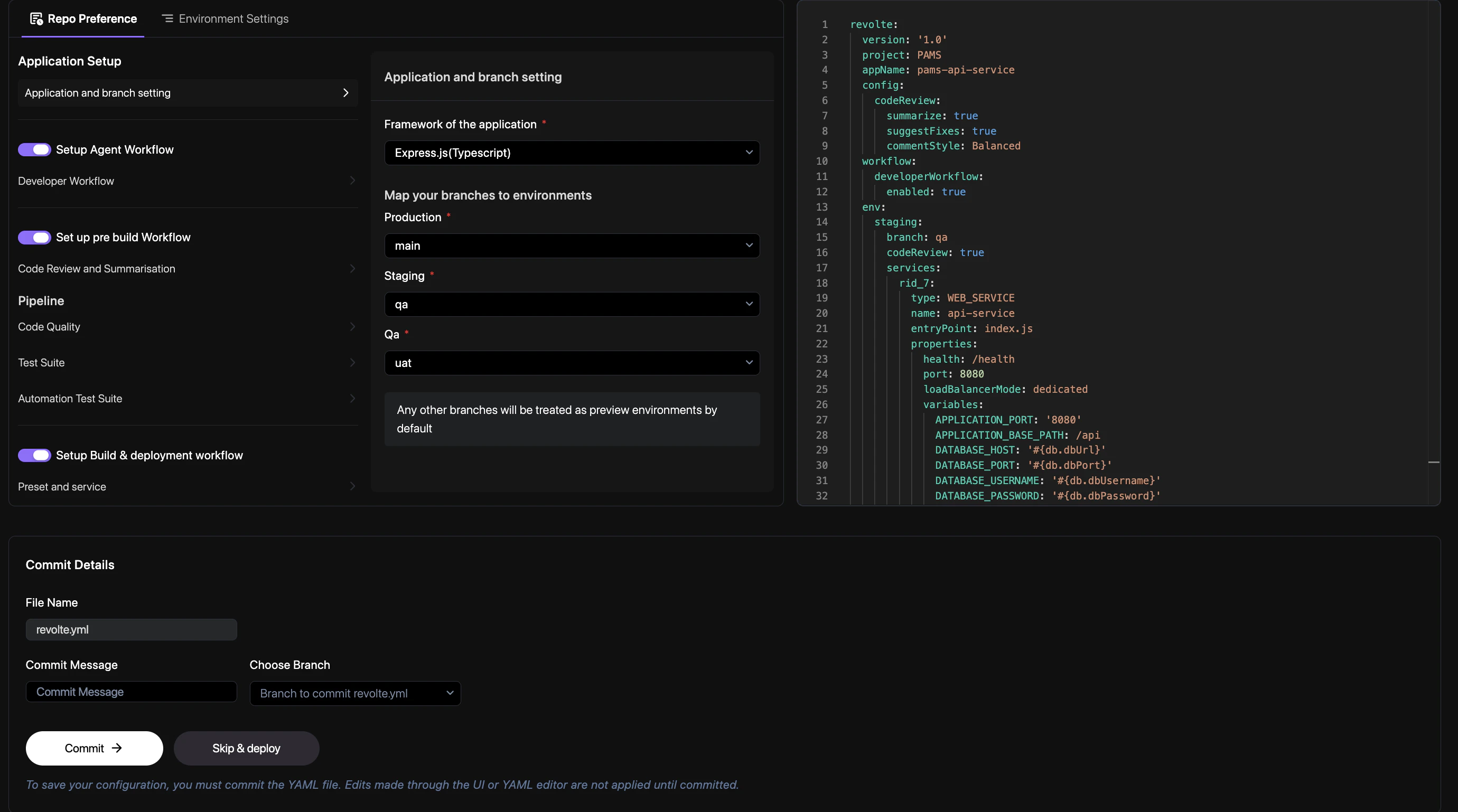
Steps to Commit
- Review YAML: Review the updated
revolte.ymlconfiguration in the editor on the right. - Enter Commit Message: Type a description of your changes in the Commit Message field.
- Choose Branch: Select the target branch from the Choose Branch dropdown menu.
- Finalize: Click the Commit button to save your changes to the repository.
Important: Edits made through the UI or YAML editor are not applied until they are committed.
You can also choose Skip & deploy if you want to test changes without committing, but these
will not be persisted in your
revolte.yml.Manual Updates
If you prefer to edit yourrevolte.yaml directly in your code editor, simply commit and push your changes. Revolte will automatically detect the update and apply the new configuration.