

This guide explains how to configure a Database resource in Revolte. Databases are modular building blocks that can be deployed standalone or as part of a combined full-stack preset.Documentation Index
Fetch the complete documentation index at: https://www.sunny-dev.info/llms.txt
Use this file to discover all available pages before exploring further.
Combined Deployments
If your application requires compute (API) alongside a database, you should select one of the following presets during the Choose a Preset step:- Webservice + Database
- Webservice + Database + StorageBucket
- Webservice + Database + Cache
- Webservice + Database + StorageBucket + Cache
Note: For all combined presets, the core configuration workflow is identical to a standard Web Service. This guide focuses specifically on the supplemental Database settings described below.
Choose a Preset
Select the Database tile for a standalone instance, or choose one of the combined presets listed above for full-stack deployments.
Database — Environment Settings
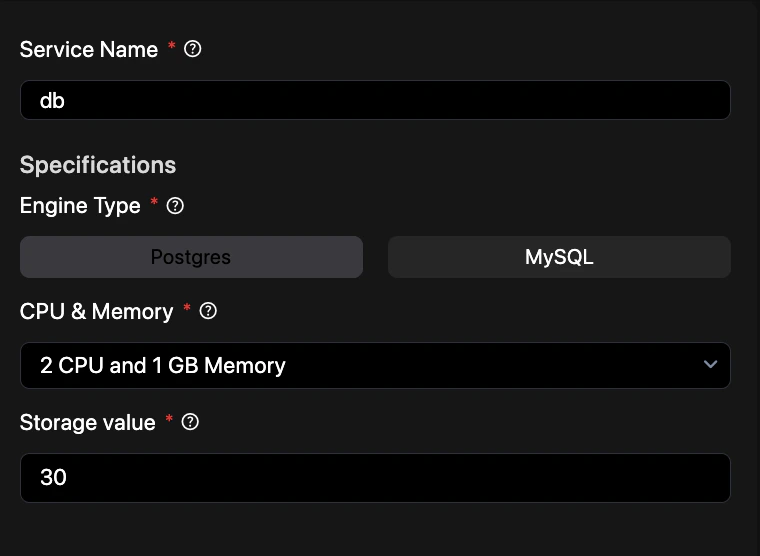
- Service Name — Enter a unique identifier for this database instance (e.g.,
production_db). - Specifications
- Engine Type — Choose between supported database engines (e.g.,
PostgreSQL,MySQL). - CPU & Memory — Choose a compute tier for your database workload. Available options:
2 CPU and 1 GB Memory2 CPU and 2 GB Memory2 CPU and 4 GB Memory2 CPU and 8 GB Memory4 CPU and 16 GB Memory8 CPU and 32 GB Memory16 CPU and 64 GB Memory48 CPU and 192 GB Memory96 CPU and 384 GB Memory
- Storage value — Disk space in GB allocated to the database (e.g.,
50).
- Engine Type — Choose between supported database engines (e.g.,
Tip: Revolte automatically generates connection strings for your database and injects them as secrets into linked services.
Quick Reference: