

This guide explains how to configure a Cache resource in Revolte. Managed Redis caches are modular building blocks used for high-speed data retrieval and session management.Documentation Index
Fetch the complete documentation index at: https://www.sunny-dev.info/llms.txt
Use this file to discover all available pages before exploring further.
Combined Deployments
If your application requires compute (API) alongside a cache, you should select one of the following presets during the Choose a Preset step:- Webservice + Cache
- Webservice + Database + Cache
- Webservice + StorageBucket + Cache
- Webservice + Database + StorageBucket + Cache
Note: For all combined presets, the core configuration workflow is identical to a standard Web Service. This guide focuses specifically on the supplemental Cache settings described below.
Choose a Preset
Select the Cache tile for a standalone instance, or choose one of the combined presets listed above for integrated deployments.
Cache — Environment Settings
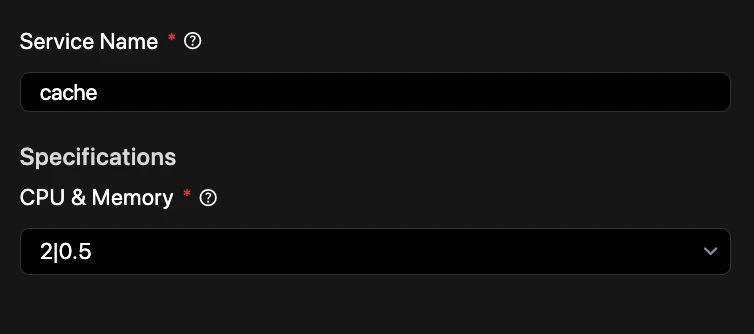
- Service Name — Enter a unique identifier for this cache instance (e.g.,
app_cache). - Specifications
- CPU & Memory — Choose a compute tier that matches your caching workload. Available options:
2 CPU and .5 GB Memory2 CPU and 1.37 GB Memory2 CPU and 3.09 GB Memory2 CPU and 6.38 GB Memory2 CPU and 13.07 GB Memory4 CPU and 12.93 GB Memory4 CPU and 26.32 GB Memory8 CPU and 26.04 GB Memory8 CPU and 52.82 GB Memory16 CPU and 52.26 GB Memory16 CPU and 105.81 GB Memory32 CPU and 103.68 GB Memory32 CPU and 209.55 GB Memory48 CPU and 157.12 GB Memory48 CPU and 317.77 GB Memory64 CPU and 209.55 GB Memory
- CPU & Memory — Choose a compute tier that matches your caching workload. Available options:
Tip: Use a cache to store session data, frequently accessed database queries, or pre-rendered content to improve application response times.
Quick Reference: