

This guide explains how to configure a Cron resource in Revolte. Cron jobs are modular building blocks used for recurring tasks and background processing.Documentation Index
Fetch the complete documentation index at: https://www.sunny-dev.info/llms.txt
Use this file to discover all available pages before exploring further.
Combined Deployments
If your application requires compute (API) alongside a scheduled task, you should select one of the following presets during the Choose a Preset step:- Webservice + Cron
- Webservice + Database + Cron
- Cron + Database
- Cron + Cache
- Cron + Database + Cache
Note: For all combined presets, the core configuration workflow is identical to a standard Web Service. This guide focuses specifically on the supplemental Cron settings described below.
Choose a Preset
Select the Cron tile for a standalone instance, or choose one of the combined presets listed above for integrated deployments.
Cron — Environment Settings
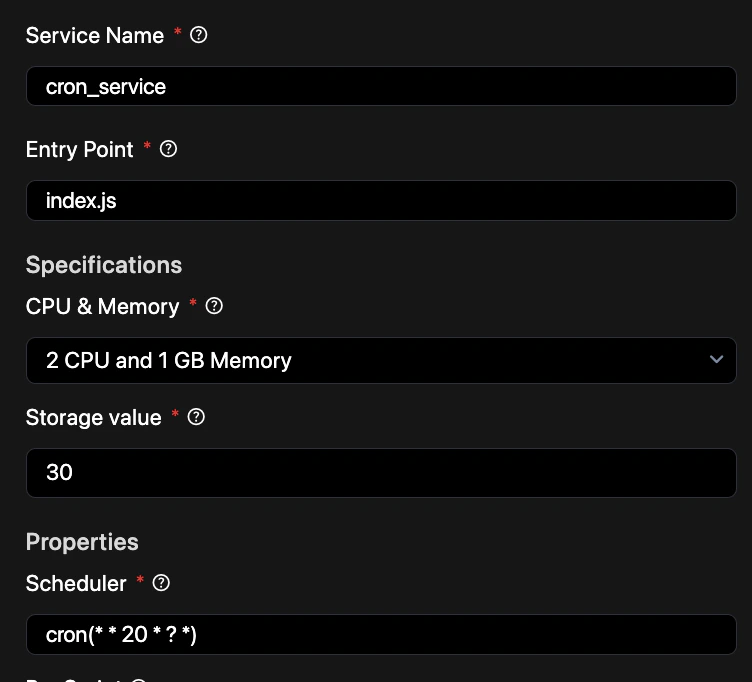
- Service Name — Enter a unique identifier for this cron job (e.g.,
daily_cleanup). - Entry Point — The script or command that starts the task (e.g.,
scripts/cleanup.js). - Specifications
- CPU & Memory — Choose a compute tier appropriate for the job’s complexity.
- Storage value — Disk space in GB allocated for the job’s temporary files.
- Properties
- Scheduler — Define the execution frequency using standard cron syntax (e.g.,
cron(0 0 * * *)for daily at midnight).
- Scheduler — Define the execution frequency using standard cron syntax (e.g.,
- Pre Script — Commands to run before the main task (e.g., installing dependencies or setting up data).
Tip: Test your cron expressions using a validator to ensure they trigger at the expected intervals before committing.
Quick Reference: